



about
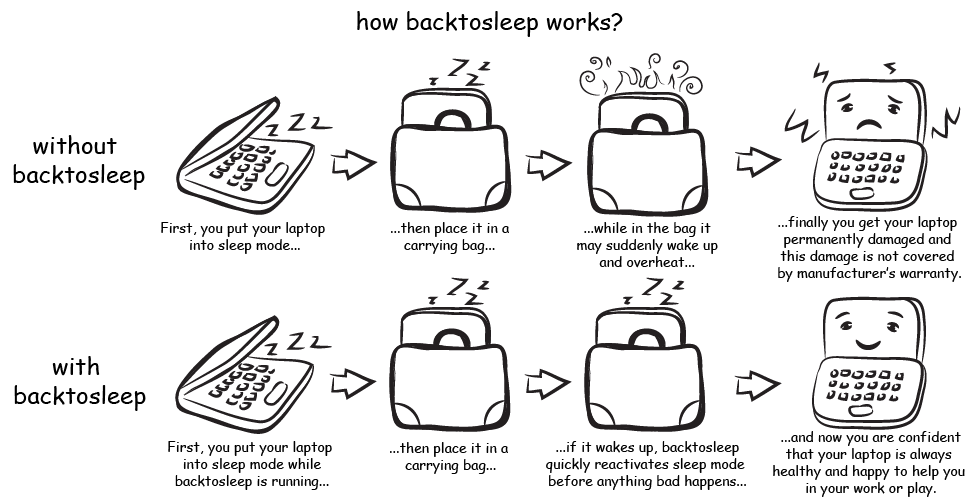
BackToSleep protects your Windows laptop from being permanently damaged as a result of overheating caused by unwanted awakening from a sleep mode during storage or transportation in limited space. Read more...
features
- retuns laptop to sleep mode in case of unwanted awakening
- automatically detects user activity to stay awake
- warns with sounds and unmutes if needed
- keeps log of events and actions
- bonus feature: optionally keeps screen turned off when laptop is locked
news
April 24, 2016
BackToSleep 2014 R1 updated for compatibility with latest release of Windows 10January 06, 2015
BackToSleep 2014 R1 released, Windows 8.1 compatibility, improved detection returning from sleep state
screenshots
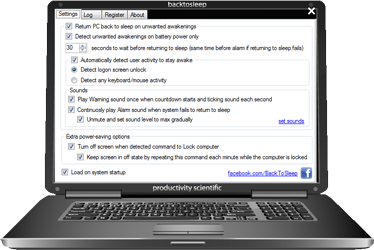 Settings window
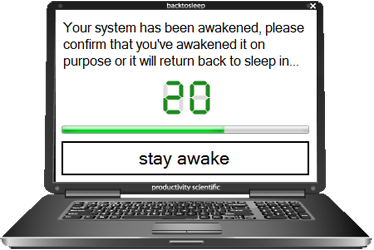 Countdown before returning to sleep
 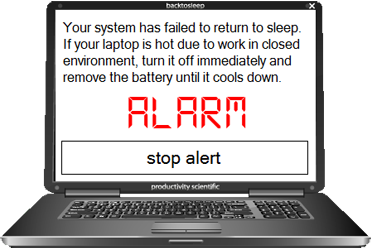 Alarm when failed to return to sleep
system requirements
 BackToSleep works on any Windows 10, 8.1, 8, 7, Vista or XP computer including x32 and x64 systems. It's more reasonable to use it on laptop or tablet, but you may find useful to run it on desktop too.
why sleep mode without backtosleep is not safe?
If you keep your laptop in sleep (standby) mode you have to know that your computer may unpredictably wake for multiple resons:
1)External devices like USB keyboard or mouse may awake your PC. Bluetooth or LAN adapters, modems and other devices can send command wake computer from sleep mode too. Read our guide how to stop mouse from waking computer.
2)Operating system itself and even any thirdparty software may wake your PC on schedule. By default Windows Update will install updates at 3 a.m. Any software may add itself to system scheduler which will wake PC to run the task. Read how to stop software from waking computer.
3)Power button of your laptop may be pressed accidentally in carring bag. Lid opening sensor may activate when your laptop is moved. There is no known alternative to BackToSleep to prevent this.